Once you've plugged your holes, and rid your mail server of spam; you need to assess the damage.
If you send a lot of mail though Hotmail, you might consider joining their SNDS site which tells you if your being blocked by their site, and gives you your IP status history, and an excerpt of offending mail headers.
The offending mail header is really helpful to finding out who is sending out the spam.
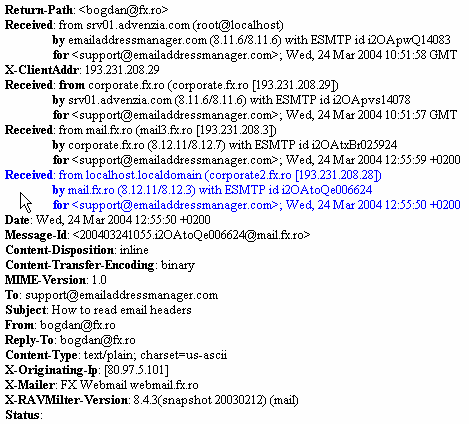
In the example above, you can clearly see that the sender is "bogdan@fx.ro". This might be helpful if you are having trouble tracking down the culprit at the server level.
I recently learned of another service which I use religiously now called SENDERBASE. You can check the status of your IP on a more global scale, and see if server are still receiving spam from you.
So this is now part of my morning routine. I peruse both sites for my IP reputation. This will give me a heads-up before your IP provider contacts you about it. You can say that you've already fixed the problem.
addendum: If your listed on sites like spamcop, ipblacklist, and others of the like; most of them do provide a way to get de-listed. You will of course need to provide information about what occurred, and what you did to eliminate the issue.
My experience as I used Debian Linux to provide and expand services for my clients.
Showing posts with label spam. Show all posts
Friday, May 16, 2014
Postfix management / Mail administrator primer
I thought I'd write a little primer with some of the most important commands you will use as a mail administrator.
Most servers will use postfix. So I will concentrate on postfix centric commands.
How to check your mail queue:
# postqueue -p
This will all mail that is in the queue waiting to be delivered. This is usually the first place I go to check if someone is sending spam from my server.
Once you find a domain that is sending out spam, you should probably stop your mail server.
Shutdown postfix:
# /etc/init.d/postfix stop
At this point you should probably "plug the hole". What I mean by that is that you should locate the compromised email account and change the password, and notify the user.
If is being generated by the site itself, it will usually say the mail is from "PHPMAILFUNCTION@xzy.com". In that case, you will need to contact the site administrator for that site, and disable the MAIL function in the .htaccess file (if your server supports it).
One you plug the hole, you'll want to delete all the mail in the queue that is coming from that site. Use the following command (replacing example.com with the offending domain):
# find /var/spool/postfix/* -type f -exec grep -irl "example.com" {} \; -exec rm -vf {} \;
Re-run # postqueue -p to double-check you've got it all.
Once you are satisfied your eliminated all the spam in the queues, you can restart the mail server with:
# /etc/init.d/postfix start
That's it, you are good to go. Next I will write an article about accessing the damage done to your IP reputation.
Most servers will use postfix. So I will concentrate on postfix centric commands.
How to check your mail queue:
# postqueue -p
This will all mail that is in the queue waiting to be delivered. This is usually the first place I go to check if someone is sending spam from my server.
Once you find a domain that is sending out spam, you should probably stop your mail server.
Shutdown postfix:
# /etc/init.d/postfix stop
At this point you should probably "plug the hole". What I mean by that is that you should locate the compromised email account and change the password, and notify the user.
If is being generated by the site itself, it will usually say the mail is from "PHPMAILFUNCTION@xzy.com". In that case, you will need to contact the site administrator for that site, and disable the MAIL function in the .htaccess file (if your server supports it).
One you plug the hole, you'll want to delete all the mail in the queue that is coming from that site. Use the following command (replacing example.com with the offending domain):
# find /var/spool/postfix/* -type f -exec grep -irl "example.com" {} \; -exec rm -vf {} \;
Re-run # postqueue -p to double-check you've got it all.
Once you are satisfied your eliminated all the spam in the queues, you can restart the mail server with:
# /etc/init.d/postfix start
That's it, you are good to go. Next I will write an article about accessing the damage done to your IP reputation.
Subscribe to:
Posts (Atom)