Beware with some of the free templates from freshjoomlatemplates.com as they have scripts embedded in them that can take over your site and use it to send spam.
I already had a bad experience that cost me days of downtime and having to move my server to a different colo.
The up-side is that my new service has never been interrupted by DDOS attacks so far.
Thursday, June 19, 2014

Monday, June 9, 2014
Limiting recursive lookups in Bind
Limiting recursive lookups in Bind is a good idea for several reasons:
acl "trusted" {
111.222.333.444/55;
127.0.0.1;
localhost;
localnets;
};
options {
directory "/var/cache/bind";
auth-nxdomain no; # conform to RFC1035
additional-from-auth no;
additional-from-cache no;
allow-query { any; };
allow-recursion { trusted; };
allow-query-cache { trusted; };
};
- Why give free DNS service to the entire internet.
- A source of denial of service flood attack.
- Increases traffic, which may increase costs.
- Increases CPU usage.
acl "trusted" {
111.222.333.444/55;
127.0.0.1;
localhost;
localnets;
};
options {
directory "/var/cache/bind";
auth-nxdomain no; # conform to RFC1035
additional-from-auth no;
additional-from-cache no;
allow-query { any; };
allow-recursion { trusted; };
allow-query-cache { trusted; };
};
Binding postfix to use a specific ip address.
Now-a-days with SPF records and such, it's always a good idea to limit postfix to use the ip address specified in the spf record to prevent your mail from being marked as spam. This is only necessary if your server has more that one ip bound to it.
In /etc/postfix/main.cf add:
smtp_bind_address = 111.222.333.444
This will limit your postfix server to using the ip specified.
In /etc/postfix/main.cf add:
smtp_bind_address = 111.222.333.444
This will limit your postfix server to using the ip specified.
Friday, May 16, 2014
IP / Spam Damage control
Once you've plugged your holes, and rid your mail server of spam; you need to assess the damage.
If you send a lot of mail though Hotmail, you might consider joining their SNDS site which tells you if your being blocked by their site, and gives you your IP status history, and an excerpt of offending mail headers.
The offending mail header is really helpful to finding out who is sending out the spam.
 In the example above, you can clearly see that the sender is "bogdan@fx.ro". This might be helpful if you are having trouble tracking down the culprit at the server level.
I recently learned of another service which I use religiously now called SENDERBASE. You can check the status of your IP on a more global scale, and see if server are still receiving spam from you.
So this is now part of my morning routine. I peruse both sites for my IP reputation. This will give me a heads-up before your IP provider contacts you about it. You can say that you've already fixed the problem.
addendum: If your listed on sites like spamcop, ipblacklist, and others of the like; most of them do provide a way to get de-listed. You will of course need to provide information about what occurred, and what you did to eliminate the issue.
If you send a lot of mail though Hotmail, you might consider joining their SNDS site which tells you if your being blocked by their site, and gives you your IP status history, and an excerpt of offending mail headers.
The offending mail header is really helpful to finding out who is sending out the spam.
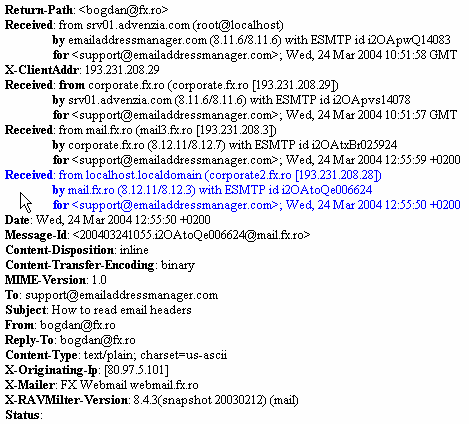
I recently learned of another service which I use religiously now called SENDERBASE. You can check the status of your IP on a more global scale, and see if server are still receiving spam from you.
So this is now part of my morning routine. I peruse both sites for my IP reputation. This will give me a heads-up before your IP provider contacts you about it. You can say that you've already fixed the problem.
addendum: If your listed on sites like spamcop, ipblacklist, and others of the like; most of them do provide a way to get de-listed. You will of course need to provide information about what occurred, and what you did to eliminate the issue.
Joe's DataCenter, not for the faint of heart.
Hi guys, just thought I'd post my recent experience.
I had a server at Joes DataCenter. They unplugged me and gave me the silent treatment for days. They would not allow me to communicate with them through phone nor their ticket system.
They did this on the grounds that I was damaging their IP reputation by spamming.
Although there were previous occasional incidents of users having changed their passwords to something like 1234 and getting picked-up by a spambot; and spamming for a few days. What caused this last and final rift was a COM_JCE exploit on Joomla CMS software. JDC couldn't seem to wait until I was able to patch all the 35+ sites to remedy the problem. They unplugged my server; and discontinued my service.
They were however nice enough to allow me to extract some important data belonging to one of my customers after several days of down time. But only after I called another company to pickup my server for data-recovery services.
So if you're a bullet-proof super-admin that never has any issues, their service is great. If you're like me and are learning as you go, you might look elsewhere.
Needless to say, I had them packup and ship my server to another colo-service provider.
I had a server at Joes DataCenter. They unplugged me and gave me the silent treatment for days. They would not allow me to communicate with them through phone nor their ticket system.
They did this on the grounds that I was damaging their IP reputation by spamming.
Although there were previous occasional incidents of users having changed their passwords to something like 1234 and getting picked-up by a spambot; and spamming for a few days. What caused this last and final rift was a COM_JCE exploit on Joomla CMS software. JDC couldn't seem to wait until I was able to patch all the 35+ sites to remedy the problem. They unplugged my server; and discontinued my service.
They were however nice enough to allow me to extract some important data belonging to one of my customers after several days of down time. But only after I called another company to pickup my server for data-recovery services.
So if you're a bullet-proof super-admin that never has any issues, their service is great. If you're like me and are learning as you go, you might look elsewhere.
Needless to say, I had them packup and ship my server to another colo-service provider.
Postfix management / Mail administrator primer
I thought I'd write a little primer with some of the most important commands you will use as a mail administrator.
Most servers will use postfix. So I will concentrate on postfix centric commands.
How to check your mail queue:
# postqueue -p

This will all mail that is in the queue waiting to be delivered. This is usually the first place I go to check if someone is sending spam from my server.
Once you find a domain that is sending out spam, you should probably stop your mail server.
Shutdown postfix:
# /etc/init.d/postfix stop
At this point you should probably "plug the hole". What I mean by that is that you should locate the compromised email account and change the password, and notify the user.
If is being generated by the site itself, it will usually say the mail is from "PHPMAILFUNCTION@xzy.com". In that case, you will need to contact the site administrator for that site, and disable the MAIL function in the .htaccess file (if your server supports it).
One you plug the hole, you'll want to delete all the mail in the queue that is coming from that site. Use the following command (replacing example.com with the offending domain):
# find /var/spool/postfix/* -type f -exec grep -irl "example.com" {} \; -exec rm -vf {} \;
Re-run # postqueue -p to double-check you've got it all.
Once you are satisfied your eliminated all the spam in the queues, you can restart the mail server with:
# /etc/init.d/postfix start
That's it, you are good to go. Next I will write an article about accessing the damage done to your IP reputation.
Most servers will use postfix. So I will concentrate on postfix centric commands.
How to check your mail queue:
# postqueue -p

This will all mail that is in the queue waiting to be delivered. This is usually the first place I go to check if someone is sending spam from my server.
Once you find a domain that is sending out spam, you should probably stop your mail server.
Shutdown postfix:
# /etc/init.d/postfix stop
At this point you should probably "plug the hole". What I mean by that is that you should locate the compromised email account and change the password, and notify the user.
If is being generated by the site itself, it will usually say the mail is from "PHPMAILFUNCTION@xzy.com". In that case, you will need to contact the site administrator for that site, and disable the MAIL function in the .htaccess file (if your server supports it).
One you plug the hole, you'll want to delete all the mail in the queue that is coming from that site. Use the following command (replacing example.com with the offending domain):
# find /var/spool/postfix/* -type f -exec grep -irl "example.com" {} \; -exec rm -vf {} \;
Re-run # postqueue -p to double-check you've got it all.
Once you are satisfied your eliminated all the spam in the queues, you can restart the mail server with:
# /etc/init.d/postfix start
That's it, you are good to go. Next I will write an article about accessing the damage done to your IP reputation.
Wednesday, August 21, 2013
Setting I/O priorities for jobs
Sometimes you need to make a large copy/backup of a couple of hundred gigs. The problem comes in the form that nothing else can get done because that job is using 100% of the I/O. Then your utilization goes though the roof because everything is getting backed-up and nothing can get done.
You can install IOTOP to identify which job is the one using up all the IO. Once you have it identified you can run IONICE to change the priority of the job.
For example, I want a certain process (PID 12404) to only use I/O when no other process requires it, because the task is I/O-heavy, but is not high priority:
# ionice -c3 -p 12404
You can install IOTOP to identify which job is the one using up all the IO. Once you have it identified you can run IONICE to change the priority of the job.
For example, I want a certain process (PID 12404) to only use I/O when no other process requires it, because the task is I/O-heavy, but is not high priority:
# ionice -c3 -p 12404
Subscribe to:
Posts (Atom)