I use a combination of Fail2Ban and Denyhosts on my servers(Please look at the Denyhosts post if you want to know why).
It's pretty straight forward with:
apt-get install fail2ban
Edit the jail.conf with:
nano /etc/fail2ban/jail.conf
I like to receive emails and snippets of the logfile. So I use:
action = %(action_mwl)s
and in the /etc/fail2ban/action.d/sendmail.conf just alter the dest = root line to whatever mail you want. Just make sure that the sender = address actually exists or they might get dumped to the spam folder.
Wednesday, March 22, 2017

Guide for installing proxmox on Debian Jessie
Here is a great guide on installing Proxmox on a Debian Server.
https://pve.proxmox.com/wiki/Install_Proxmox_VE_on_Debian_Jessie
https://pve.proxmox.com/wiki/Install_Proxmox_VE_on_Debian_Jessie
Sunday, March 20, 2016
Beginner Guide to LVM
LVM allows you to resize and combine partitions, etc. This is especially great when you environment is virtualized and you don't have physical access to the machine. You can't exactly easily boot your favorite linux disto on a VM to resize your existing partitions.
Great guide to LVM
https://www.howtoforge.com/linux_lvm
Great guide to LVM
https://www.howtoforge.com/linux_lvm
Fix Locale Errors
Running this will fix locale errors:
export LANG=en_US.UTF-8
export LANGUAGE=en_US.UTF-8
export LC_CTYPE="en_US.UTF-8"
export LC_NUMERIC="en_US.UTF-8"
export LC_TIME="en_US.UTF-8"
export LC_COLLATE="en_US.UTF-8"
export LC_MONETARY="en_US.UTF-8"
export LC_MESSAGES="en_US.UTF-8"
export LC_PAPER="en_US.UTF-8"
export LC_NAME="en_US.UTF-8"
export LC_ADDRESS="en_US.UTF-8"
export LC_TELEPHONE="en_US.UTF-8"
export LC_MEASUREMENT="en_US.UTF-8"
export LC_IDENTIFICATION="en_US.UTF-8"
export LC_ALL=en_US.UTF-8
dpkg-reconfigure locales
To make the change permanent, I ran
update-locale LC_CTYPE=en_US.UTF-8 which writes to /etc/default/locale.
If you use bash as your shell, you can put these lines in your~/.bashrcand~/.profile
Friday, June 19, 2015
mod_bw vs mod_bwshare vs mod_cband
I know there is a lot of confusion over what to use and how to use it. This is what I've been able to gather from lightly looking over the documentation:
mod_bw: Will limit every user to a specific amount of bandwidth or limit the amount fo bandwidth per file type or file size.
Once you've "apt-get install libapache2-mod-bw" and restarted apache2, you can enter one of the configurations below in the custom directives for each subdomain:
Limit every user to a max of 10Kb/s on a vhost:
<IfModule mod_bw.c>
BandwidthModule On
ForceBandWidthModule On
Bandwidth all 10240
MinBandwidth all -1
</IfModule>
Limit al internal users to 1000 kb/s with a minimum of 50kb/s , and
files greater than 500kb to 50kb/s.
<IfModule mod_bw.c>
BandwidthModule On
ForceBandWidthModule On
Bandwidth all 1024000
MinBandwidth all 50000
LargeFileLimit * 500 50000
</IfModule>
Limit avi and mpg extensions to 20kb/s.
<IfModule mod_bw.c>
BandwidthModule On
ForceBandWidthModule On
LargeFileLimit .avi 1 20000
LargeFileLimit .mpg 1 20000
</IfModule>
mod_bwshare: Will limit how much bandwidth can be consumed with in a specified amount of time per IP from a specific directory or the whole site.
Once you've "apt-get install libapache2-mod-bwshare" and restarted apache2, you can enter one of the configuration below in the custom directives for each subdomain:
<IfModule mod_bwshare.c>
BW_tx1debt_max 25
BW_tx1cred_rate 0.095
BW_tx2debt_max 3000000
BW_tx2cred_rate 2500
</IfModule>
* I won't attempt to explain these parameters here, but you can find explanations here: http://www.topology.org/src/bwshare/README.html#config
mod_cband: Will limit users’ and virtualhosts’ bandwidth usage. The current versions can set virtualhosts’ and users’ bandwidth quotas, maximal download speed (like in mod_bandwidth), requests-per-second speed and the maximal number of simultaneous IP connections (like in mod_limitipconn)limit how much bandwidth can be consumed with in a specified amount of time from a specific directory or the whole site.
Once you've "apt-get install libapache2-mod-cband", and restarted apache2, you can enter one of the configurations below in the custom directives for each subdomain:
limit to 256k per user, 3 requests per second, 3 open connections and if they exceed they go down to 128k until they stop clicking on links for a few seconds:
<IfModule mod_cband.c>
CBandRemoteSpeed 256Kbps 3 3
CBandExceededSpeed 128kbps 2 3
</IfModule>
More examples here: http://dembol.org/blog/mod_cband/faq/
mod_bw: Will limit every user to a specific amount of bandwidth or limit the amount fo bandwidth per file type or file size.
Once you've "apt-get install libapache2-mod-bw" and restarted apache2, you can enter one of the configurations below in the custom directives for each subdomain:
Limit every user to a max of 10Kb/s on a vhost:
<IfModule mod_bw.c>
BandwidthModule On
ForceBandWidthModule On
Bandwidth all 10240
MinBandwidth all -1
</IfModule>
Limit al internal users to 1000 kb/s with a minimum of 50kb/s , and
files greater than 500kb to 50kb/s.
<IfModule mod_bw.c>
BandwidthModule On
ForceBandWidthModule On
Bandwidth all 1024000
MinBandwidth all 50000
LargeFileLimit * 500 50000
</IfModule>
Limit avi and mpg extensions to 20kb/s.
<IfModule mod_bw.c>
BandwidthModule On
ForceBandWidthModule On
LargeFileLimit .avi 1 20000
LargeFileLimit .mpg 1 20000
</IfModule>
mod_bwshare: Will limit how much bandwidth can be consumed with in a specified amount of time per IP from a specific directory or the whole site.
Once you've "apt-get install libapache2-mod-bwshare" and restarted apache2, you can enter one of the configuration below in the custom directives for each subdomain:
<IfModule mod_bwshare.c>
BW_tx1debt_max 25
BW_tx1cred_rate 0.095
BW_tx2debt_max 3000000
BW_tx2cred_rate 2500
</IfModule>
* I won't attempt to explain these parameters here, but you can find explanations here: http://www.topology.org/src/bwshare/README.html#config
mod_cband: Will limit users’ and virtualhosts’ bandwidth usage. The current versions can set virtualhosts’ and users’ bandwidth quotas, maximal download speed (like in mod_bandwidth), requests-per-second speed and the maximal number of simultaneous IP connections (like in mod_limitipconn)limit how much bandwidth can be consumed with in a specified amount of time from a specific directory or the whole site.
Once you've "apt-get install libapache2-mod-cband", and restarted apache2, you can enter one of the configurations below in the custom directives for each subdomain:
limit to 256k per user, 3 requests per second, 3 open connections and if they exceed they go down to 128k until they stop clicking on links for a few seconds:
<IfModule mod_cband.c>
CBandRemoteSpeed 256Kbps 3 3
CBandExceededSpeed 128kbps 2 3
</IfModule>
More examples here: http://dembol.org/blog/mod_cband/faq/
Wednesday, May 27, 2015
How to get all your mail going out of one IP address with POSTFIX
If you have multiple IPs (ETH0,ETH0:0, etc) running on a server with Postfix, chances are you are going to run into the problem of Postfix not using the mail IP that has the matching MX record to send mail.
When this happens most of the mail servers will label your mail as SPAM and/or reject it.
You can force Postfix to use the main servers IP address by adding the following lines to your /etc/postfix/main.cf:
smtp_bind_address = 1.1.1.1
*You would replace 1.1.1.1 with the main IP of your own server.
Restart Postfix with /etc/init.d/postfix restart
This might cause your mail to backup on the server if your have other services that might need a configuration tweak to continue working correctly, check your mail queue with this:
postqueue -p
If you see mail backing up in that queue for failed connections to 127.0.0.1, then you might have to start making some tweaks. If not, then you should be OK.
If you have AMAVIS running on the server then you might need to make this tweak for AMAVIS to properly work. Create the file /etc/amavis/conf.d/60-custom. Add the following line:
@inet_acl = qw( 127.0.0.1 [::1] 1.1.1.1 );
Restart AMAVIS with /etc/init.d/amavis restart
Now check the Postfix queue with postqueue -p again. If there is any mail still there try flushing it out with postqueue -f. The recheck it after a couple of seconds with postqueue -p again. It should be all gone now.
When this happens most of the mail servers will label your mail as SPAM and/or reject it.
You can force Postfix to use the main servers IP address by adding the following lines to your /etc/postfix/main.cf:
smtp_bind_address = 1.1.1.1
*You would replace 1.1.1.1 with the main IP of your own server.
Restart Postfix with /etc/init.d/postfix restart
This might cause your mail to backup on the server if your have other services that might need a configuration tweak to continue working correctly, check your mail queue with this:
postqueue -p
If you see mail backing up in that queue for failed connections to 127.0.0.1, then you might have to start making some tweaks. If not, then you should be OK.
If you have AMAVIS running on the server then you might need to make this tweak for AMAVIS to properly work. Create the file /etc/amavis/conf.d/60-custom. Add the following line:
@inet_acl = qw( 127.0.0.1 [::1] 1.1.1.1 );
Restart AMAVIS with /etc/init.d/amavis restart
Now check the Postfix queue with postqueue -p again. If there is any mail still there try flushing it out with postqueue -f. The recheck it after a couple of seconds with postqueue -p again. It should be all gone now.
Thursday, May 14, 2015
Keeping the Botters, China and miscreants away.

My Fail2Ban is setup to send me mail every-time it bans an IP. Repeat offenders get the firewall treatment. I run a filter to move the to a separate folder of the same name.
I end up using IP tables to block the repeat offenders. They are just wasting your precious resources.
This is what I use so far:
iptables -I INPUT -m iprange --src-range 107.160.0.0-107.160.255.255 -j DROP
iptables -I INPUT -m iprange --src-range 111.72.0.0-111.79.255.255 -j DROP
iptables -I INPUT -m iprange --src-range 114.96.0.0-114.103.255.255 -j DROP
iptables -I INPUT -m iprange --src-range 120.192.0.0-120.255.255.255 -j DROP
iptables -I INPUT -m iprange --src-range 121.254.128.0-121.254.255.255 -j DROP
iptables -I INPUT -m iprange --src-range 163.177.0.0-163.177.255.255 -j DROP
iptables -I INPUT -m iprange --src-range 183.0.0.0-183.63.255.255 -j DROP
iptables -I INPUT -m iprange --src-range 185.60.229.0-185.60.229.255 -j DROP
iptables -I INPUT -m iprange --src-range 187.1.16.0-187.1.31.255 -j DROP
iptables -I INPUT -m iprange --src-range 189.213.72.1-189.213.79.254 -j DROP
iptables -I INPUT -m iprange --src-range 194.63.142.0-194.63.142.255 -j DROP
iptables -I INPUT -m iprange --src-range 219.234.174.0-219.234.174.191 -j DROP
iptables -I INPUT -m iprange --src-range 222.184.0.0-222.191.255.255 -j DROP
iptables -I INPUT -m iprange --src-range 27.255.64.0-27.255.95.255 -j DROP
iptables -I INPUT -m iprange --src-range 59.99.0.0-59.99.255.255 -j DROP
iptables -I INPUT -m iprange --src-range 60.166.0.0-60.175.255.255 -j DROP
iptables -I INPUT -m iprange --src-range 61.176.0.0-61.176.255.255 -j DROP
iptables -I INPUT -m iprange --src-range 80.82.64.0-80.82.79.255 -j DROP
iptables -I INPUT -m iprange --src-range 81.17.88.0-81.17.95.255 -j DROP
iptables -I INPUT -m iprange --src-range 89.248.174.0-89.248.174.127 -j DROP
iptables -I INPUT -m iprange --src-range 93.174.88.0-93.174.95.255 -j DROP
iptables -I INPUT -m iprange --src-range 192.99.0.0-192.99.255.255 -j DROP
iptables -I INPUT -m iprange --src-range 122.228.228.0-122.228.228.15 -j DROP
This has reduced my Fail2Ban folder from 45+ emails a day to 10 at most.
I still get the occasional flurry, but you firewall the IP range and your done.
I can handle sending out 10 abuse mail forwards a day.
Thursday, April 16, 2015
Disabling root ssh is very good Idea
Found a few good sites with too much information: They all boil down to giving SUDO access to one of your other accounts and disabling ssh access for the root account. Your can still login as root through your datacenters provisioned KVM since it emulates a local keyboard and video display. In case you ever get locked out or your IP banned for some reason.
As a failsafe, you might consider putting the public IP of a trusted source in the
/etc/hosts.allow file in case you get locked out accidentally. That why you know that all you need to do is go to that place to restore access to your account. It could be your office's public IP, or campus university public IP, or just another server you have control over.
Once you have SUDO access on another account:
Just edit /etc/ssh/sshd_config and make sure this line PermitRootLogin no , reads as so.
As a failsafe, you might consider putting the public IP of a trusted source in the
/etc/hosts.allow file in case you get locked out accidentally. That why you know that all you need to do is go to that place to restore access to your account. It could be your office's public IP, or campus university public IP, or just another server you have control over.
Once you have SUDO access on another account:
Just edit /etc/ssh/sshd_config and make sure this line PermitRootLogin no , reads as so.
Sunday, October 26, 2014
Upgraded most of my boxes to Debian 7 Wheezy and ISPCONFIG
For the most part I'm happy to be on Debian 7 with ISPCONFIG, as DTC was taking forever to update their code to make it Debian 7 compatible; and my clients were installing software requiring the latest PHP and MYSQL. So I really didn't have much of a choice in the matter.
I like and dis-like a few things about ISPCONFIG.
LIKES:
I like and dis-like a few things about ISPCONFIG.
LIKES:
- Offers and Handles multiservers very well.
- easy to install guides
- well documented
- many howto guides for just about every option
- cheap billing module
- creating a website or sub-domains does not automatically create a DNS entries/mail domains/etc, you have to expect your customers to know what they are doing. It's not as user-friendly in that aspect. It would be nice if it offered a dummy mode or wizards for users. In this aspect DTC was nice to do everything for you when you added a domain. Then you just had to do any customizations required, but the basics where created for you.
Thursday, June 19, 2014
Hacked by FreshJoomlaTemplates.com
Beware with some of the free templates from freshjoomlatemplates.com as they have scripts embedded in them that can take over your site and use it to send spam.
I already had a bad experience that cost me days of downtime and having to move my server to a different colo.
The up-side is that my new service has never been interrupted by DDOS attacks so far.
I already had a bad experience that cost me days of downtime and having to move my server to a different colo.
The up-side is that my new service has never been interrupted by DDOS attacks so far.
Monday, June 9, 2014
Limiting recursive lookups in Bind
Limiting recursive lookups in Bind is a good idea for several reasons:
acl "trusted" {
111.222.333.444/55;
127.0.0.1;
localhost;
localnets;
};
options {
directory "/var/cache/bind";
auth-nxdomain no; # conform to RFC1035
additional-from-auth no;
additional-from-cache no;
allow-query { any; };
allow-recursion { trusted; };
allow-query-cache { trusted; };
};
- Why give free DNS service to the entire internet.
- A source of denial of service flood attack.
- Increases traffic, which may increase costs.
- Increases CPU usage.
acl "trusted" {
111.222.333.444/55;
127.0.0.1;
localhost;
localnets;
};
options {
directory "/var/cache/bind";
auth-nxdomain no; # conform to RFC1035
additional-from-auth no;
additional-from-cache no;
allow-query { any; };
allow-recursion { trusted; };
allow-query-cache { trusted; };
};
Binding postfix to use a specific ip address.
Now-a-days with SPF records and such, it's always a good idea to limit postfix to use the ip address specified in the spf record to prevent your mail from being marked as spam. This is only necessary if your server has more that one ip bound to it.
In /etc/postfix/main.cf add:
smtp_bind_address = 111.222.333.444
This will limit your postfix server to using the ip specified.
In /etc/postfix/main.cf add:
smtp_bind_address = 111.222.333.444
This will limit your postfix server to using the ip specified.
Friday, May 16, 2014
IP / Spam Damage control
Once you've plugged your holes, and rid your mail server of spam; you need to assess the damage.
If you send a lot of mail though Hotmail, you might consider joining their SNDS site which tells you if your being blocked by their site, and gives you your IP status history, and an excerpt of offending mail headers.
The offending mail header is really helpful to finding out who is sending out the spam.
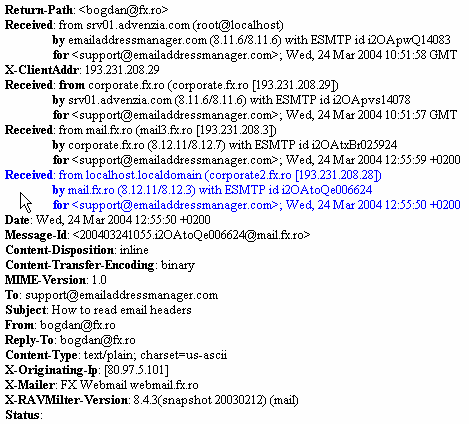
 In the example above, you can clearly see that the sender is "bogdan@fx.ro". This might be helpful if you are having trouble tracking down the culprit at the server level.
I recently learned of another service which I use religiously now called SENDERBASE. You can check the status of your IP on a more global scale, and see if server are still receiving spam from you.
So this is now part of my morning routine. I peruse both sites for my IP reputation. This will give me a heads-up before your IP provider contacts you about it. You can say that you've already fixed the problem.
addendum: If your listed on sites like spamcop, ipblacklist, and others of the like; most of them do provide a way to get de-listed. You will of course need to provide information about what occurred, and what you did to eliminate the issue.
If you send a lot of mail though Hotmail, you might consider joining their SNDS site which tells you if your being blocked by their site, and gives you your IP status history, and an excerpt of offending mail headers.
The offending mail header is really helpful to finding out who is sending out the spam.
I recently learned of another service which I use religiously now called SENDERBASE. You can check the status of your IP on a more global scale, and see if server are still receiving spam from you.
So this is now part of my morning routine. I peruse both sites for my IP reputation. This will give me a heads-up before your IP provider contacts you about it. You can say that you've already fixed the problem.
addendum: If your listed on sites like spamcop, ipblacklist, and others of the like; most of them do provide a way to get de-listed. You will of course need to provide information about what occurred, and what you did to eliminate the issue.
Joe's DataCenter, not for the faint of heart.
Hi guys, just thought I'd post my recent experience.
I had a server at Joes DataCenter. They unplugged me and gave me the silent treatment for days. They would not allow me to communicate with them through phone nor their ticket system.
They did this on the grounds that I was damaging their IP reputation by spamming.
Although there were previous occasional incidents of users having changed their passwords to something like 1234 and getting picked-up by a spambot; and spamming for a few days. What caused this last and final rift was a COM_JCE exploit on Joomla CMS software. JDC couldn't seem to wait until I was able to patch all the 35+ sites to remedy the problem. They unplugged my server; and discontinued my service.
They were however nice enough to allow me to extract some important data belonging to one of my customers after several days of down time. But only after I called another company to pickup my server for data-recovery services.
So if you're a bullet-proof super-admin that never has any issues, their service is great. If you're like me and are learning as you go, you might look elsewhere.
Needless to say, I had them packup and ship my server to another colo-service provider.
I had a server at Joes DataCenter. They unplugged me and gave me the silent treatment for days. They would not allow me to communicate with them through phone nor their ticket system.
They did this on the grounds that I was damaging their IP reputation by spamming.
Although there were previous occasional incidents of users having changed their passwords to something like 1234 and getting picked-up by a spambot; and spamming for a few days. What caused this last and final rift was a COM_JCE exploit on Joomla CMS software. JDC couldn't seem to wait until I was able to patch all the 35+ sites to remedy the problem. They unplugged my server; and discontinued my service.
They were however nice enough to allow me to extract some important data belonging to one of my customers after several days of down time. But only after I called another company to pickup my server for data-recovery services.
So if you're a bullet-proof super-admin that never has any issues, their service is great. If you're like me and are learning as you go, you might look elsewhere.
Needless to say, I had them packup and ship my server to another colo-service provider.
Postfix management / Mail administrator primer
I thought I'd write a little primer with some of the most important commands you will use as a mail administrator.
Most servers will use postfix. So I will concentrate on postfix centric commands.
How to check your mail queue:
# postqueue -p

This will all mail that is in the queue waiting to be delivered. This is usually the first place I go to check if someone is sending spam from my server.
Once you find a domain that is sending out spam, you should probably stop your mail server.
Shutdown postfix:
# /etc/init.d/postfix stop
At this point you should probably "plug the hole". What I mean by that is that you should locate the compromised email account and change the password, and notify the user.
If is being generated by the site itself, it will usually say the mail is from "PHPMAILFUNCTION@xzy.com". In that case, you will need to contact the site administrator for that site, and disable the MAIL function in the .htaccess file (if your server supports it).
One you plug the hole, you'll want to delete all the mail in the queue that is coming from that site. Use the following command (replacing example.com with the offending domain):
# find /var/spool/postfix/* -type f -exec grep -irl "example.com" {} \; -exec rm -vf {} \;
Re-run # postqueue -p to double-check you've got it all.
Once you are satisfied your eliminated all the spam in the queues, you can restart the mail server with:
# /etc/init.d/postfix start
That's it, you are good to go. Next I will write an article about accessing the damage done to your IP reputation.
Most servers will use postfix. So I will concentrate on postfix centric commands.
How to check your mail queue:
# postqueue -p

This will all mail that is in the queue waiting to be delivered. This is usually the first place I go to check if someone is sending spam from my server.
Once you find a domain that is sending out spam, you should probably stop your mail server.
Shutdown postfix:
# /etc/init.d/postfix stop
At this point you should probably "plug the hole". What I mean by that is that you should locate the compromised email account and change the password, and notify the user.
If is being generated by the site itself, it will usually say the mail is from "PHPMAILFUNCTION@xzy.com". In that case, you will need to contact the site administrator for that site, and disable the MAIL function in the .htaccess file (if your server supports it).
One you plug the hole, you'll want to delete all the mail in the queue that is coming from that site. Use the following command (replacing example.com with the offending domain):
# find /var/spool/postfix/* -type f -exec grep -irl "example.com" {} \; -exec rm -vf {} \;
Re-run # postqueue -p to double-check you've got it all.
Once you are satisfied your eliminated all the spam in the queues, you can restart the mail server with:
# /etc/init.d/postfix start
That's it, you are good to go. Next I will write an article about accessing the damage done to your IP reputation.
Wednesday, August 21, 2013
Setting I/O priorities for jobs
Sometimes you need to make a large copy/backup of a couple of hundred gigs. The problem comes in the form that nothing else can get done because that job is using 100% of the I/O. Then your utilization goes though the roof because everything is getting backed-up and nothing can get done.
You can install IOTOP to identify which job is the one using up all the IO. Once you have it identified you can run IONICE to change the priority of the job.
For example, I want a certain process (PID 12404) to only use I/O when no other process requires it, because the task is I/O-heavy, but is not high priority:
# ionice -c3 -p 12404
You can install IOTOP to identify which job is the one using up all the IO. Once you have it identified you can run IONICE to change the priority of the job.
For example, I want a certain process (PID 12404) to only use I/O when no other process requires it, because the task is I/O-heavy, but is not high priority:
# ionice -c3 -p 12404
Tuesday, July 30, 2013
Warning: Database file needs update - warning: /etc/aliases, line 2: record is in "key: value" format; is this an alias file?
I was investigating an error that I commonly receive in Logwatch every morning.
2 *Warning: Database file needs update ------------------------------
2 /etc/aliases
So I did what any normal person would do and GREPed the logs and ended up with this error:
/var/log/syslog:Jul 30 07:49:41 mx postfix/postmap[11224]: warning: /etc/aliases, line 2: record is in "key: value" format; is this an alias file?
So I did what any admin would do and ran newaliases, however that produced this error:
/var/log/syslog.1:Jul 29 17:03:48 mx postfix/smtpd[4062]: warning: database /etc/aliases.db is older than source file /etc/aliases
So after doing several Google searches I ended up finding a forum that gave me running this as a solution:
postalias /etc/aliases
That seemed to fix the problem. I could run newaliases after than without any error.
2 *Warning: Database file needs update ------------------------------
2 /etc/aliases
So I did what any normal person would do and GREPed the logs and ended up with this error:
/var/log/syslog:Jul 30 07:49:41 mx postfix/postmap[11224]: warning: /etc/aliases, line 2: record is in "key: value" format; is this an alias file?
So I did what any admin would do and ran newaliases, however that produced this error:
/var/log/syslog.1:Jul 29 17:03:48 mx postfix/smtpd[4062]: warning: database /etc/aliases.db is older than source file /etc/aliases
So after doing several Google searches I ended up finding a forum that gave me running this as a solution:
postalias /etc/aliases
That seemed to fix the problem. I could run newaliases after than without any error.
Saturday, July 27, 2013
AutoMysqlBackup adds another layer of assurance
Nothing causes me loss of sleep more than the though of loosing data. To add another layer of assurance, AutoMysqlBackup helps me sleep better at night.
Just run:
apt-get install automysqlbackup
This utility automatically schedules a back of all your databases on a daily, weekly and monthly basis.
So you can always rollback(considering that you have matching nightly backup for your WWW files) if a disaster occurs.
Just run:
apt-get install automysqlbackup
This utility automatically schedules a back of all your databases on a daily, weekly and monthly basis.
So you can always rollback(considering that you have matching nightly backup for your WWW files) if a disaster occurs.
Friday, July 26, 2013
New server is UP, BBU, cache and learning about IPMI
The new 2U server is on-line with the drives from the old T300 server (which are only 2 months old).
I'm constantly rsyncing my files from the rented server to the 2U server so that when I'm ready to switch over there will be less to sync. The thing that takes me the longest, is actually migrating the databases.
I discovered that there is a Battery Backup Unit(BBU) for my 3ware 9550SX raid controller that is optional. This is necessary to keep the writes in cache alive in memory, in case of a power failure. Those writes get written to the disks once the power is restored. Enabling the cache will also increase the performance. I found a new BBU on Ebay for $120 bucks and ordered it. No it's just waiting for it to arrive.
I discovered that to get the KVM operating on the LAN NIC, it required a jumper to be moved. Once I had that done and was able to access it, I discovered that I had a non-KVM IPMI. I didn't even know that "that" existed. I can get into the KVM and monitor just about every sensor, as well as reboot the server, but with no KVM; I can't change BIOS options and such. I found a new IPMI with KVM support for my motherboard on Ebay for 99 bucks. I really can't wait for this one to arrive, because sometime I want to tweak something in the BIOS and just can't get a KVM from my DATACENTER because there is a waiting list.
The server only came with 8 gigs of RAM so I placed another 8 on order. I just can't operate on 8 gigs. It would be the death of me. As it is there is enough traffic on that server to have to swap out to disk with 16gigs, so 24 or 32 gigs is a future goal.
I'm constantly rsyncing my files from the rented server to the 2U server so that when I'm ready to switch over there will be less to sync. The thing that takes me the longest, is actually migrating the databases.
I discovered that there is a Battery Backup Unit(BBU) for my 3ware 9550SX raid controller that is optional. This is necessary to keep the writes in cache alive in memory, in case of a power failure. Those writes get written to the disks once the power is restored. Enabling the cache will also increase the performance. I found a new BBU on Ebay for $120 bucks and ordered it. No it's just waiting for it to arrive.
I discovered that to get the KVM operating on the LAN NIC, it required a jumper to be moved. Once I had that done and was able to access it, I discovered that I had a non-KVM IPMI. I didn't even know that "that" existed. I can get into the KVM and monitor just about every sensor, as well as reboot the server, but with no KVM; I can't change BIOS options and such. I found a new IPMI with KVM support for my motherboard on Ebay for 99 bucks. I really can't wait for this one to arrive, because sometime I want to tweak something in the BIOS and just can't get a KVM from my DATACENTER because there is a waiting list.
The server only came with 8 gigs of RAM so I placed another 8 on order. I just can't operate on 8 gigs. It would be the death of me. As it is there is enough traffic on that server to have to swap out to disk with 16gigs, so 24 or 32 gigs is a future goal.
Tuesday, July 23, 2013
The new server has arrived at the collocation center
The server has arrived but not unpacked yet.
I'm pre-emptivly backing up my configuration, files and databases to a rented dedicated server so when the time comes for the final backup and sync it won't take too long.
The plan is to:
I'm pre-emptivly backing up my configuration, files and databases to a rented dedicated server so when the time comes for the final backup and sync it won't take too long.
The plan is to:
- power up the rented dedicated server which won't be pulled until the 31st.
- Migrate my sites and data back to that server. (2-3 hours)
- remove the 4 1tb drives, 2 of the 4 gig DDR ECC memory and install them on the new server.
- Load the OS and migrate my site and data to the new server in case the raid set is not identified
- Power down my rented dedicated server and the tower server.
- Packup the tower server with all the left-over bits and pieces(extra raid controllers, memory dimms, cables,etc) and ship them back to me.
Subscribe to:
Posts (Atom)